
If you’re a regular PayPal user, take note: Scammers are regularly targeting PayPal and its customer base. These scams can affect all types of PayPal users, including individuals making purchases, people receiving personal payments from friends and family, and the self-employed using PayPal for business.
A brief overview of PayPal scams
In this article, we will explore the most common PayPal scams, including:
- Advanced fee scams: These encourage users to send a small fee in order to receive a much larger return.
- Scam emails: These emails will notify you that something is wrong with your account, providing you with a link to click on, which leads to a phishing website.
- “Friendly name” email scams: In these email scams, a person will use a friendly-looking display name; in this case, one that looks legitimately related to PayPal. This scam helps to bypass email spam filters.
- Phishing websites: This refers to a website that looks like the official PayPal website but is, in fact, a fake one set up by scammers. By entering your details on one of these sites, you will provide them to the scammer.
- Fake hyperlink scams: These are links, that may be present within scam emails, that claim to point to the official PayPal website but which will actually take you to a phishing website.
- Fake charities: This involves scammers pretending to be from a charity, asking for a ‘donation’ to help a particular cause.
- Overpayment scams: This is when an individual scammer making a purchase from a vendor overpays for the product or service and asks to be reimbursed for the overpayment but with the money sent to a different account. The account they made the purchase with is likely stolen, whereas the other account is the one they will profit from.
How to avoid being scammed on PayPal
The easiest way to protect yourself against PayPal scams is to be vigilant. If you receive an email claiming to be from PayPal, ignore any links it contains and visit the site directly to see if there are any issues. Also, scammers like to offer more money than was asked for so that you can cover made-up fees or shipping charges. You can sidestep this by simply refusing to negotiate when selling items online.
It’s a good idea to install a reputable antivirus program too. This way, if you do accidentally download malware from a phishing email, you can quarantine the threat and delete it before it does too much damage.
We recommend Norton Security and TotalAV: two excellent virus scanners with apps for all platforms. What’s more, both services include a money-back guarantee so you can try them risk-free.
What is a PayPal scam?
PayPal scams can come in the form of emails, phishing sites, malicious ads, suspicious links, and more. Such scams are designed to look official in order to trick users into giving up private data, such as usernames and passwords, or to illegitimately collect payments. Numerous PayPal scams exist, but there are several that you’re more likely to run into.
PayPal scammers are improving their methods all the time, so that it becomes increasingly difficult to tell that a fake PayPal email, link, or site is, in fact, fake. If you’re not careful and attentive, you can easily fall into the trap of treating a scam as legitimately connected to PayPal. And the result could potentially be a significant financial loss, with no means of getting the money back. If you are ever suspicious about an email or link related to PayPal, it’s important to report it. Doing so will help PayPal to crack down on these scams.
The 7 most common PayPal scams
Here are seven common PayPal scams that we’ve located, as well as how to avoid becoming a victim to them
1. Advanced fee scam
One scam PayPal users should be wary of is more commonly known as Advanced Fee Fraud. This type of fraud, of which the infamous “Nigerian Prince” or 419 scams fall into, are designed to trick victims into sending a comparatively small amount of money with the promise of a much larger return.
PayPal users are often targeted with this scam because of the difficulty that exists with getting money returned.
Advanced fee scams over PayPal often work like this:
You receive an email with a subject line in ALL CAPS claiming you’ve received inheritance.

Upon opening the email, you find what appears to be an official letter from someone in a high political station.
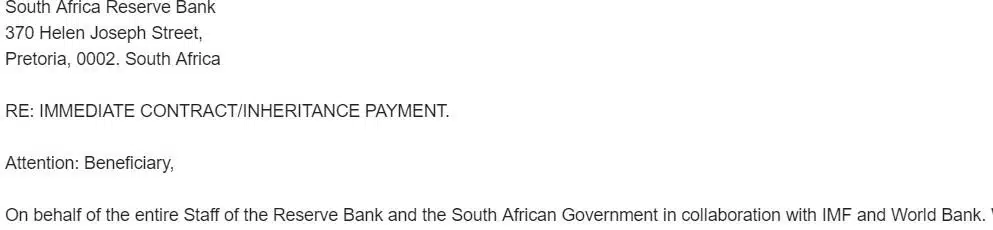
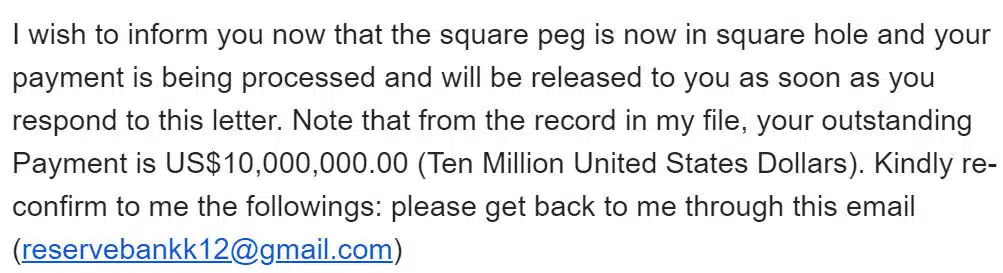
Next, they’ll tell you that you’re due a rather insane amount of money for rather dubious reasons.
And finally, you’ll be asked to provide some basic information that will open the lines of communication.
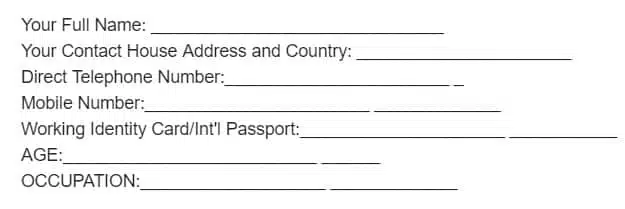
Ultimately, the scam collects personal information from you that can be used in identity fraud, while also grifting money from victims. The warning signs for this scam are clear, however, and avoiding this type of scam is relatively easy.
How to avoid advanced fee scams
Thankfully, your email service provider filters out the vast majority of these types of scams. If you check your email spam folder, you may even be able to find a few of them (we sure did).
However, if an email asking you to make some type of advanced payment in order to receive a greater reward does elude your spam filter, pay attention to the warning signs. The email address likely won’t be from a verified or legitimate business or service, and likely won’t match the name, organization, or government official mentioned in the email text. Additionally, there will likely be a large number of spelling or grammar errors within the body of the email, which is another warning sign that it’s not from a legitimate source.
Overall, however, it’s best not to send advanced payments, especially to individuals you have never met or don’t know. Unless you’re purchasing products through a trusted ecommerce store, donating to a cause, or sending family or friends money, do not trust suspicious sources online requesting money. If it seems too good to be true, it probably is.
2. Scam email: “A problem with your account”
One PayPal scam comes in the form of an email that erroneously states that there’s a “problem with your account”. The intent here is to get you to open the email out of concern. It’s followed by text designed to get you to click on a link within the email that ultimately leads to a phishing website.
A visitor recently forwarded us a copy of the PayPal scam email below. We were able to track down where the scam site was hosted and have it shut down within about 5 minutes. We also located where the stolen information was being sent from the website and notified PayPal to make sure they shut down that site and contacted any affected customers.
How to avoid “problem with your account” scams
- DO NOT respond to the email or enter any personal information. If you’ve already entered information, quickly go to our How to Report a Scam page.
- Forward the email to spoof@paypal.com. PayPal will immediately work to shut down the scam site.
- Forward the email to spam@uce.gov. The U.S. Federal Trade Commission (FTC) will place your email in a database and use the combined information to track down and prosecute the scammer/spammers.
- Do not click on links in unsolicited emails.
This kind of scam has been around for a long time. The scammers send an email to you telling you there’s a problem with your PayPal account and that you need to log in to correct it. Here’s what the email looks like.
Once you look it over, go on to see what the fake PayPal website looks like:
Important Note: Here’s where the scammers get tricky. The link text says “https://www.paypal.com/cgi-bin/webscr/?cmd=_login-run”. It looks legitimate. It looks like you will be sent to the secure PayPal site. But you won’t.
Click this link – https://www.paypal.com/cgi-bin/webscr/?cmd=_login-run
Oops! We’re not in Kansas anymore Toto. This is a very important point. The text of a link can say anything. Where it points to can be completely different. Don’t pay any attention to the link text. You have to pay attention to the address bar in your browser (see our test on our Scams and Fraud homepage).
Here is the text from the fake Paypal page:
Dear Paypal User,
Today we had some trouble with one of our computer systems. While the trouble appears to be minor, we are not taking any chances. We decided to take the troubled system offline and replace it with a new system. Unfortunately this caused us to lose some member data. Please follow the link below and log into your account to make sure your information is not affected. Account balances have not been affected.
Because of the inconvenience this causes we are giving all users that repair their missing data their next two incoming transfers for free! You will pay no fees for your next two incoming transfers*.
https://www.paypal.com/cgi-bin/webscr/?cmd=_login-run
Thank you for using PayPal!
* – If fees would normally apply, you will not pay anything for the next two incoming transfers you receive.
PayPal Security
PROTECT YOUR PASSWORD
NEVER give your password to anyone and ONLY log in at PayPal’s website. If anyone asks for your password, please follow the Security Tips instructions on the PayPal website.
As you can see, this scam email does everything it can do to convince you that it’s legitimate. However, unless the email is coming directly from PayPal, ignore it. And always check the links included in a scam email to verify that they’re the real deal.
“Problem with your account” PayPal scams can be fairly sophisticated as well, as noted by this scam highlighted by internet security company ESET.
3. “Friendly name” or display name spoofing
Another form of email scam, “friendly name” email scams use a feature of email systems that allows the sender name to be hidden behind a “friendly name” that can be made to look legitimate.
Many email services now use a “display name” for individuals, sites, or services with which you regularly interact via email. Instead of displaying the full email address every time, you may instead see a “display name”, which is often the name of the individual or service.
Scammers can use this system to their advantage by creating an email address with a display name that might exist in your address book. When you get an email from the fake account, not only can it bypass spam filters, it may look completely legitimate when connected to an equally legitimate-looking email (such as some “problem with your account” scam emails).
For example, this email spoofing the USPS uses display name spoofing:

With PayPal spoofing, the scam could change the display name to anything that might appear to be legitimate, including using common words you might associate with a legitimate business, such as “PayPal Customer Service”.
How to avoid “friendly name” scams
A few simple steps can help you quickly identify whether an email is actually from PayPal or a scammer:
- Open the suspected email, but DON’T click on any links in the email
- Hover over the display name in the email if the entire email address is not visible
Email service providers vary. In Gmail, for example, simply opening the email will reveal the entire address in most cases, including the display name and the web address. Your email app might require you to hover over the display name to reveal the address, however. Due to size constraints, mobile email apps often hide the email address entirely and only show the display name, which can be very misleading.
Ensure that the address completely matches a real web address for PayPal. Additionally, make sure that the entire web address is legitimate. Any email coming from PayPal will have an email address that ends in @paypal.com. Any variation of that, such as @intl.paypal.com, is likely a scam.
4. Phishing websites or social media posts (fake PayPal website or social media scams)
Many popular websites get spoofed in various ways. When scammers create a fake PayPal website and try to collect user information through, they are usually part of a phishing scam.
Phishing is a collection of tactics used to impersonate trusted entities, tricking victims into giving up information. They set up fraudulent websites and email addresses that are designed to look legitimate. The hope is that you’ll interact with the fake site, and ultimately give up private information, including usernames, passwords, financial account information, or anything else that can be used to steal money or your identity.
There are many phishing websites out there, and in fact, according to Google’s Transparency Report, phishing sites are now a far more common type of fraudulent activity on the web than malware sites. In fact, phishing sites outnumber malware sites 8 to 1, meaning you’re far more likely to encounter a phishing site designed to look real and steal your information than you are to run into a site attempting to install malicious software onto your computer.
Here’s what a fake PayPal website may look like:
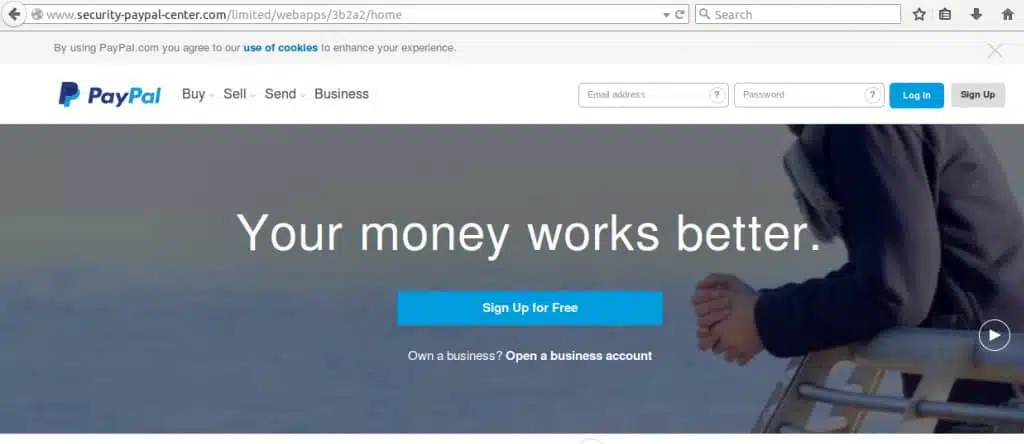
You’ll note quickly that this scam site looks exactly like an old version of PayPal’s website. Without looking at the details, it’s easy to get fooled into thinking this site is real. But there are a few ways to avoid falling for phishing site traps like this one.
You’ll additionally need to be on the lookout for phishing scams in the form of promoted or shared social media posts. TNW reported on one such scam that Twitter allowed to propagate, where the scammer bought ad space and pretended to be an official (although unverified) Twitter employee offering users a chance to win Twitter-sponsored sweepstakes.
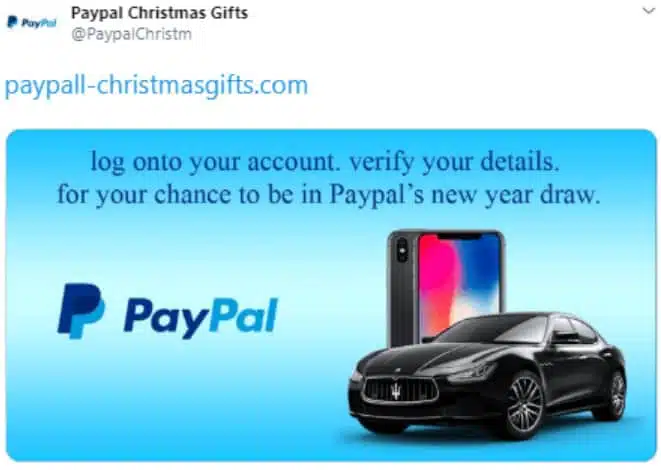
The scam pushed individuals to a phishing website which was designed to look like a real Twitter page. The ultimate goal was to get users to enter their username and password into the form, which would not actually log into PayPal, but instead collect private information.
How to avoid PayPal phishing site scams and social media posts
First, the easiest way to determine if you’re on the correct PayPal website is to check the web address in the URL address bar:

Note that the web address reads “security-paypal-center.com”. This is not a real PayPal address. The official PayPal address is “paypal.com”. Any other version is likely a scam. Additionally, PayPal does not use unique region-based domains, such as “co.uk” for the UK, or “co.jp” for Japan. All other variations will automatically reroute to URL that starts with “www.paypal.com”.
Next, check the certification status of the website. In the above example, you’ll notice that there is no lock symbol next to the URL. This indicates that the website does not have an HTTPS (or SSL) certificate. At present, most legitimate websites and businesses have SSL certificates and HTTPS encryption.
If the PayPal site you’re on does not have a lock symbol, do not trust it. It’s likely a phishing site. While PayPal currently does not have the most effective guard against phishing sites, an Extended Validation certificate (which reveals the name of the organization alongside the lock symbol), you can still check the certification to verify that it’s legitimately owned by PayPal.com.
- Click on the lock symbol
- Click on Certificate
- Click on the Details tab
- Under Field, click on Subject
Check the details listed here. You should see the following information, or something similar:
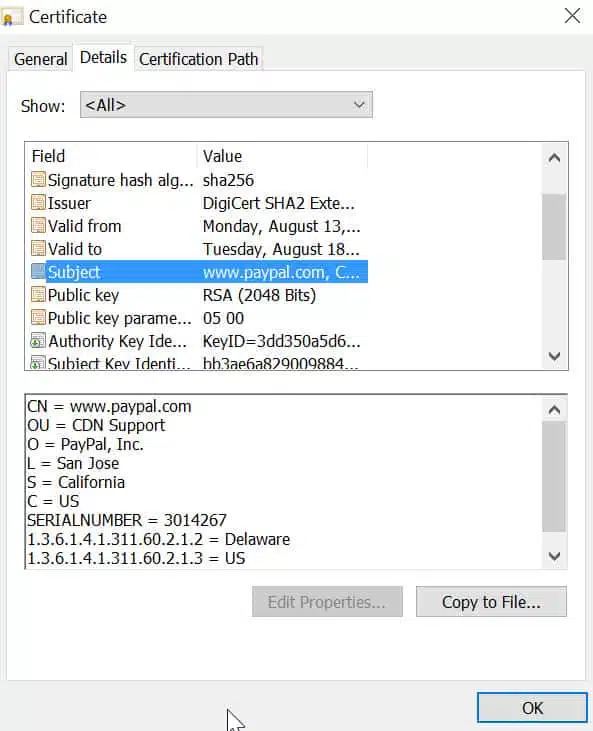
If the information looks vastly different, or there is no information available, you are likely on a phishing site and should close the tab immediately.
It’s also worth noting that many antivirus solutions offer real-time protection from phishing sites like these. For more information, check out our review of the top antivirus products in 2021.
5. Fake hyperlink scam
Fake web address scams can appear as part of other types of scams, including within email scams, and quite obviously as a part of a phishing website. However, it’s possible you may find some internet thieves will create fake hyperlinks designed to appear legitimate in the text, but the actual URL is fake.
As discussed earlier, a hyperlink text can say anything we want it to.
How to avoid hyperlink scams
Hyperlink scams are comparatively easy to avoid, and there’s one simple step: On a personal computer or desktop, hover over a suspected link before clicking on it. Doing so will bring up the actual hyperlink URL in your web browser window.

On a mobile device, long press on the link to reveal the URL it’s actually sending you to.
If the hyperlink goes somewhere other than the stated target or is clearly not a link to PayPal, do not click on it.
6. Fake charities and investment opportunities
Scammers tend to focus on trying to play to each victims’ emotions. In some cases, this can include feelings of pity or greed. Either can cause some victims to walk right into PayPal scams without considering the consequences.
Fake charities occasionally pop up following a tragedy, or once scammers get hold of enough information about a victim to try to target them with a fake charity scam. In these situations, the fake charity may have a website, or simply send information over the web, and will ask for payment through PayPal or other means.
Meanwhile, fake investment opportunities similar to 419 or Nigerian Prince-style scams try to convince potential victims that a seemingly small investment can reap a big reward.
How to avoid fake charities and investment opportunities
Remember the old phrase, “too good to be true”? This will always apply to investment opportunities. Anyone promising a high reward for seemingly little investment should raise your alarms.
If you receive a suspicious-looking, “too good to be true” investment opportunity asking you to send PayPal payment, do the following:
- Use the BBB (Better Business Bureau) to look up the company. Bad ratings, or a non-existent company, are a red flag.
- If you can’t find the existence of a company through the BBB, do a basic Google search for it by name, and look for any forums or other locations where it’s talked about. A lack of information is also a red flag, and of course, negative information should be your sign that it’s not a trustworthy investment opportunity
For charities, PayPal itself recommends using one of the following websites:
Note that any charity that you can’t verify the existence of through any of these options is likely not a real charity. Charities must be registered with the government, so if you can’t find information about it, it’s best to avoid donating money. Chances are, plenty of official and trusted charities will be collecting money for the same cause.
7. Overpayment scam and hacked PayPal account scam)
This is a scam that PayPal vendors should be concerned about. The overpayment scam works like this:
- You sell a product or service to an individual or “business”
- The buyer sends payment but sends too much
- The buyer then asks you to return the difference to them, often requesting that you return the money to a different account
This seems innocuous enough, but it’s likely that the buyer is a scam artist attempting to get you to pay them money from a stolen payment account. It’s possible the buyer was using a stolen credit card or other bank information to make the phony purchase and then asking you to return part of that money. In this case, not only does the buyer get a product or service obtained illegitimately, but he also gets some of that money back, deposited into a different account that will likely be untraceable later.
Here’s the major problem for sellers: If the real account holder reports fraudulent activity, PayPal may cancel the payment you received and return the money to the rightful owner. If that happens, you’ll be out both the money and the product you sold.
Another subset of this is the hacked account scam. In this situation, the buyer is paying with a PayPal account that has been hacked. The buyer receives the item, but you may be forced to refund payment to the actual account holder. In this case, you’ll lose out on both the item and the money you paid.
How to avoid overpayment scams
Legitimate buyers rarely overpay, so if you do receive an overpayment, it’s likely a scam. If that happens, instead of returning the money, cancel the order altogether and do not ship the item. Additionally, never return a payment to an account different from the one that originally made the payment.
How to avoid hacked account scams
It’s almost impossible to tell when a buyer has hacked an account. There’s also little you can do to help prevent this or avoid this situation. A mismatch in buyer account information and where products are getting shipped is normal.
Your best option is to contact PayPal directly. PayPal offers merchant fraud protection for all sellers who utilize PayPal. If you believe a mismatch in payment account information and the requested shipping address looks suspicious, contact PayPal. The company will investigate the issue, and contact the buyer to verify information. It’s also best to delay shipping any items until the issue is resolved.
You may also want to contact the buyer directly through the email address associated with the PayPal account to help verify the account and buyer match.
PayPal also offers advice and information on other types of scams and how to avoid them, here and here.
How to report a PayPal scam
PayPal scams have become so common that there’s now an entire page dedicated to them on the PayPal site. If you’ve come across a scam, you can report the issue directly to PayPal.
The reporting process is a little different if you’ve actually fallen victim to a PayPal scam. You should certainly also report it to PayPal, but you may also want to report it elsewhere too. If you have been scammed out of money or defrauded via PayPal, it’s important that you report the case to local law enforcement. You should also contact your banking institute who can also launch a fraud case of their own. Whether you can be refunded or not will depend entirely on the details of the scam, and unfortunately, it’s not guaranteed.